> ## Documentation Index
> Fetch the complete documentation index at: https://docs.subtotal.com/llms.txt
> Use this file to discover all available pages before exploring further.
# Rewarding linked accounts
> Award Smile points when a customer links a retailer account.
In the Subtotal Dashboard, navigate to your [Smile integration](https://dashboard.subtotal.com/integrations/smile) and click `Add action`.
Choose `account.linked` as the event, give the action a name, optionally restrict to specific retailers, and set the **Points** value. The action name is what the customer will see in their Smile activity feed, so pick something recognizable (e.g. `Linked a retail account`).
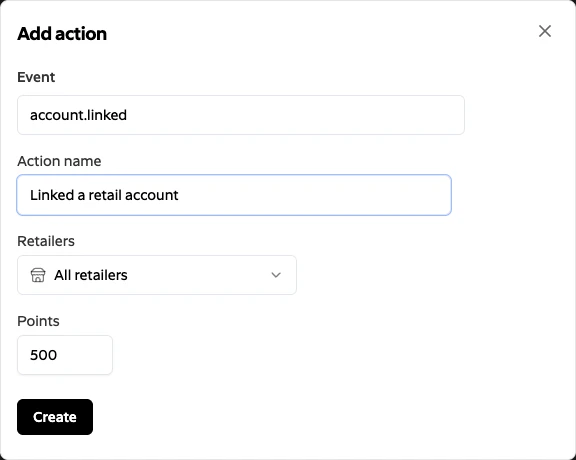 Click `Create`. Subtotal will now award the configured points in Smile whenever a customer links a qualifying retailer account.
Points are awarded on the first successful activation of each connection. Re-authenticating an existing connection (for example, after a retailer password change) does not re-award points. Creating a fresh connection after a disconnect will.
Click `Create`. Subtotal will now award the configured points in Smile whenever a customer links a qualifying retailer account.
Points are awarded on the first successful activation of each connection. Re-authenticating an existing connection (for example, after a retailer password change) does not re-award points. Creating a fresh connection after a disconnect will.